RosettaCloud™
Multi-cloud self-service
Learn one cloud.
Work on all of them.
Every cloud has its own API, its own vocabulary and its own console. RosettaCloud puts one interface over all of them, so launching a cluster is the same operation whichever cloud it lands on. Manage everything from a customisable dashboard, a desktop app, or the command line.
Three core actions
Build it. Launch it. Share it.™
Describe an environment once. Launch it in one click. Share it with anyone, with no IAM tickets.
Build
Write Formations once. Capture everything an environment needs in one template.
- Compute, storage, networking in one recipe
- Keys, certificates, images all included
- Clone, customise, snapshot
- CloudFormation & Terraform scripts wrap in
- Version, preview, iterate
Launch
Launch in one click, with governance, budgets and quotas already applied.
- AWS, Azure, GCP, OVH, OpenStack
- One-click sessions, HPC, big data, labs
- Jupyter, RStudio, VS Code included
- Launches inherit RosettaOps policy
- Automate via CLI, SDKs, OpenAPI, MCP
Share
Right-click to share with anyone: across accounts, across clouds, no IAM work.
- Share with users, groups, organisations
- Delegated credentials, auto-revoked on unshare
- Users in multiple unrelated orgs
- Curated portfolios as private marketplaces
- Publish to the public marketplace in one step
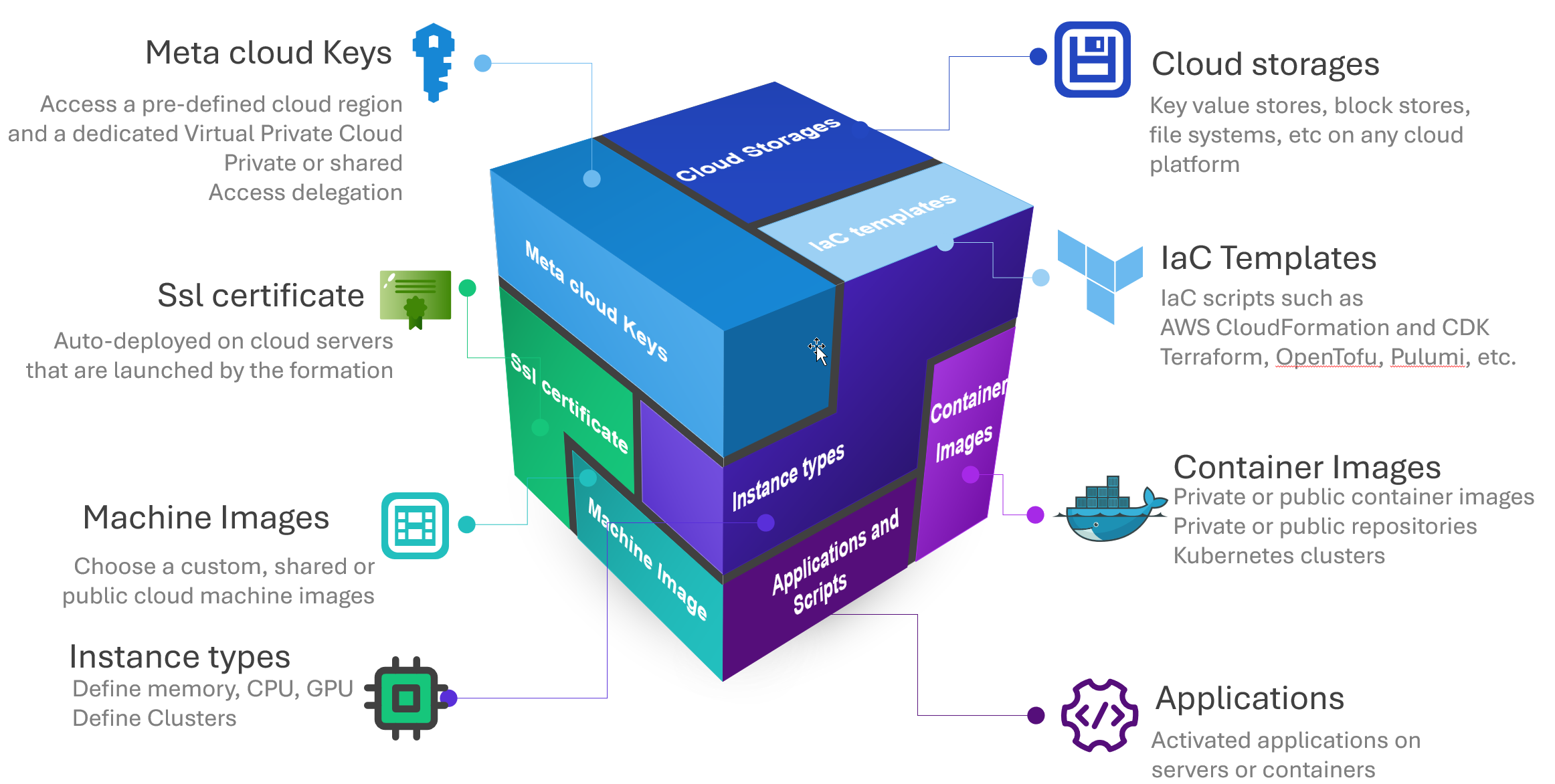
A Formation combines everything needed for a deployment into one reusable, shareable template
Moving a Formation between clouds is not a copy: machine images have to be converted and the keys are tied to a network and a region. What does carry across unchanged is everything you learned, because the operations are identical wherever you run them.
One interface, every cloud
The same API, whichever
cloud it lands on
Every provider names the same idea differently and shapes its API around its own history. RosettaCloud presents one set of operations over all of them, so what you learn on the first cloud is what you already know on the second.
Compute
Instance lifecycle, spot capacity, regions and machine types
Storage
Volumes, snapshots and file systems
Object storage
Buckets, objects and static hosting
Images
Register, snapshot and share machine images
Networking
Virtual networks, security groups, addresses and interfaces
Kubernetes
Clusters and node groups, with the drivers installed for you
Containers
Container services and private registries
Big data and HPC
Managed Hadoop, Spark and HPC clusters
Keys and encryption
SSH key pairs and managed encryption keys
DNS and CDN
Hosted zones, records and content delivery
Infrastructure as code
CloudFormation and Terraform stacks, launched and tracked as Formations
Federated access
Time-limited sessions into the provider console for everything else
The dashboard, the desktop app, the command line and the open API all speak this one vocabulary.
What a Formation can be
A Formation is a described environment. It can be one machine or a whole cluster, and each kind has a spot variant where interruption is survivable.
Machines and pools
A single machine, or a pool that hands one out per person. The workspace pattern behind a class, a workshop or a team of analysts.
Virtual labs
A full desktop in the browser, with no client to install. Jupyter, RStudio, VS Code and Linux or Windows desktops.
Kubernetes clusters
Cluster and node groups, with autoscaler, ingress, monitoring and the storage drivers installed rather than left to you.
Container clusters
Managed container services and the registries behind them, for work that does not need a full Kubernetes cluster.
Big data and HPC
Hadoop and Spark and HPC clusters that come up configured, run the job, and go away again.
Your own stacks
CloudFormation and Terraform you already wrote, launched and tracked as Formations so they carry the same budgets and sharing.
What you can do with RosettaCloud

Launch anything in one click
Spin up Jupyter notebooks, virtual desktops, HPC clusters, or big data environments. No console needed. No cloud expertise required.

Deploy the same template everywhere
The same operations, the same objects and the same command names on every cloud you connect. Terraform gives you one workflow, not one API: the resource blocks are different per provider, so a template still has to be translated. Here it does not.

Share anything like a Google Doc
Share anything with anyone: across accounts, across clouds, like a Google Doc. No IAM work, no tickets. Non-admins can share too.

Work from anywhere
Use the web dashboard, the desktop app, or the command line. Automate with SDKs and the open API. Talk to your cloud estate through AI. Every interface gives you the same power.
Never get locked in
Build on a unified layer that works across clouds. If you ever need to move providers, your templates, workflows, and skills come with you. No rewriting, no retraining.
Connect data across clouds
Mount storage from one cloud on a machine running on another. Share datasets, images, and snapshots across teams. Break down cloud silos without moving data.
Built for every team
Data Scientists
Spin up GPU machines, notebooks, and training pipelines in seconds. Share datasets and results with your team. Focus on models, not infrastructure.
Engineers
Launch and manage infrastructure with the same operations on every cloud, from the CLI, the SDKs or the open API. No more rewriting your automation for each provider.
Researchers
Launch HPC clusters and big data environments without IT tickets. Reproduce any experiment. Share computational environments across labs. Every dollar saved on cloud waste is a dollar that funds another grant.
Educators
Deploy virtual labs for an entire class in minutes. Students work in the browser. No cloud accounts needed. Serving universities since 2016. Every dollar saved on cloud waste is a dollar that funds another scholarship.
One product. Everything included.
Containers, VMs, virtual labs, HPC and big data. Every feature on every plan, with nothing held back.
Ready to simplify your cloud?
Start free on AWS Marketplace or book a demo to see RosettaCloud in action.
Common questions
What can people launch with RosettaCloud?
Machines and machine pools, notebook environments such as Jupyter and RStudio, virtual labs, containers and Kubernetes clusters, Spark and Hadoop clusters, HPC clusters, and infrastructure defined in CloudFormation. Storage, images, keys and certificates are managed alongside them.
Whose cloud accounts does everything run in?
Yours. Resources are created in your own cloud accounts and billed to you by the provider at your own rates. Nothing runs on our infrastructure and no data leaves your estate to reach us.
Can the same environment run on more than one cloud?
The operations are the same on every cloud, so the way you launch, manage, share and govern an environment does not change between providers. The underlying resources are still provider-specific: a machine image has to exist on the cloud you are launching into, and keys are bound to their own cloud and region.
Do users need their own cloud credentials?
No. People work through the portal, the command line or the API, and the platform issues whatever access is needed for as long as it is needed. For anything provider-specific, a time-limited federated session drops them into that cloud’s own console under the same budgets and policy.